 Jury
Jury
In short — Digital tools in class can amplify learning or replace it with something that looks like learning. The difference doesn’t lie in the tool — it lies in what the student is doing cognitively with it. One filtering question: does this tool increase the student’s mental activity, or substitute for it? Here’s how to apply that question concretely — and why student privacy matters when choosing tools.
The problem with technology for technology’s sake
We’ve all seen the gimmick version: the colorful padlet full of unlabeled images, the quiz that takes twenty minutes for five questions, the beautifully designed slide deck that replaces an oral presentation with a wall of text nobody reads. These tools work. Students enjoy them. And they teach almost nothing.
The problem isn’t digital technology itself — it’s using technology as a signal (“I teach with modern tools”) rather than as a learning amplifier. Education researcher Ruben Puentedura formalized this diagnosis with the SAMR model: a digital tool can substitute, augment, modify, or redefine a task. Only the last two levels produce learning that surpasses what you’d get without the tool.
For everyday classroom use, you don’t need the full SAMR framework. One question is enough.
The test question: does it amplify or replace?
Before using a digital tool with a class, ask: does this tool amplify the student’s cognitive activity, or replace it?
- Amplifies: a retrieval quiz (Socrative, Kahoot used well, a Google Form) forces active recall — students search memory for the answer. The error log lets you target review. Hard to do as effectively at scale on paper.
- Replaces: a padlet where students paste an image found in five seconds on Google. Cognitive activity? Near zero. The paper version (hand-annotated diagram) would have produced more learning with less distraction.
This criterion isn’t anti-technology — it’s pro-lean, effective technology. And it saves time: if the analog version works just as well, keep the analog version. Digital earns its place when it does something paper and pencil genuinely can’t do as well.
💡 A practical test: could students do this activity just as well on paper? If yes, the digital version probably adds more friction than value — and more potential distraction.
Uses that genuinely change the game
A few digital uses that pass the test clearly:
- Regular retrieval quizzes: Socrative, Quizlet, Mentimeter, or even a shared Google Form — three questions on the previous session at the start of class activates retrieval practice (see our article on assessing class participation every day). No expensive subscription required.
- Real-time collaborative writing: shared synthesis, mutually taken notes, peer correction in real time. What paper doesn’t do.
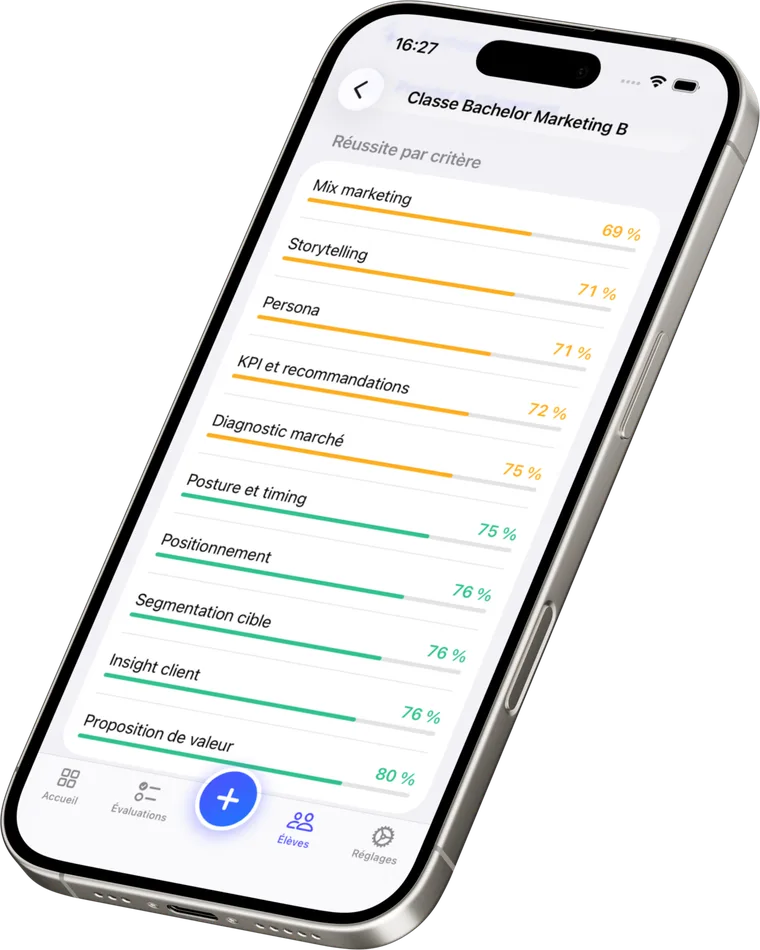
- Capturing and tracking oral assessments: grading an oral live on a dedicated app — timer, strengths, areas to improve — without taking your eyes off the student. This is precisely what Tissyo Jury is built for: the teacher stays with their student, the tool handles the record. Student data stays on the teacher’s devices and in their private iCloud; Tissyo has no server that receives it.
- Access to primary sources: digitized archives, text corpora, real datasets for a statistics lesson. Digital gives access to sources that simply don’t exist in classroom paper form.
Uses that waste time
On the other side, a few recurring patterns that create an illusion of learning:
- The over-designed presentation that took two hours to make and contains ten lines of actual content. The medium replaced the thinking.
- Competitive Kahoot where speed beats reflection and the slowest students learn they’re the slowest. Useful for warm-ups, disastrous as an assessment or consolidation tool.
- Unguided internet research: “find information about…” with no selection criteria or precise question produces copy-paste, not understanding.
- Autocomplete tools used to avoid the effort of writing. If the AI drafts the answer and the student copies it, no learning happened.
Student privacy and tool selection
The pedagogical criterion alone isn’t enough. When you use a digital tool with underage students, you’re responsible for their data. A few simple rules:
- Avoid non-approved free consumer services: their business model often relies on collecting and monetizing data — including from students.
- Minimize data entered: a first name is enough in most tools. Full name + school + grade is far more than necessary for a review quiz.
- Prefer data-lean tools: tools that work offline or store data locally don’t transmit anything to third-party servers. That’s the choice Tissyo Jury made: student data stays on the teacher’s devices and in their private iCloud; Tissyo has no server that receives it (the only exception is anonymous usage measurement, off by default).
This isn’t paranoia — it’s basic care for students whose data belongs to their families, not to advertising platforms. It’s also a trust argument with parents and administrators. For a deeper look at student data obligations, see our article on grading bias in oral assessment — understanding your responsibilities as an assessor connects directly to data hygiene.
Making choices without spending hours on it
Two questions are enough before adopting any digital tool:
- Does it amplify the student’s cognitive activity, or replace it?
- Are my students’ data handled soberly and in compliance with applicable rules?
If both answers are yes, the tool earns its place. If either answer is no, find an alternative — or go back to paper and pencil, which has never collected data and has never needed Wi-Fi.
Wrap-up
Digital tools in class are useful when they amplify what students do mentally — not when they replace it with something that looks like learning. A retrieval quiz, real-time collaboration, a live oral assessment record: these pass the test. A decorative padlet, a content-free slide deck, unguided internet search: much less so. And in every case, choosing tools that respect student privacy isn’t optional — it’s a professional responsibility.
Frequently asked questions
How do I know if a digital tool actually improves learning?
Ask one question: does this tool amplify the student’s cognitive activity, or replace it? If the paper-and-pencil version would produce the same learning with less friction, keep the paper and pencil.
Should I avoid digital tools with struggling students?
Not necessarily — but the priority is always cognitive activity, not the medium. A tool that masks difficulty without addressing it (autocomplete, AI-generated answers) doesn’t help them progress.
Are my students’ data safe with classroom apps?
It depends on the tool. Free consumer-tier services often monetize data. Prefer tools approved by your institution that store data locally or in compliant servers. When in doubt, minimize what you enter: a first name is usually enough where a full name is asked by default.
Does technology replace oral work in class?
No — and that’s one of the traps. Digital tools tend to route communication through writing, which can paradoxically reduce real speaking time. Good tech use frees up class time for oral interaction rather than replacing it.