Tissyo Studio for Mac

Record once. Never explain it twice.

Turn one screen recording into a video and a step-by-step guide.

Apple silicon and macOS 15 or later.

Also available for Windows →

The guide inspector and the A4 pages of the step-by-step guide in Studio.

No more “can you show me again?”

Build your documentation as you make tutorials. Everyone can use the format that suits them.

#finance-team14 members
  1. Leah9:10

    Hey! Can you show me again where to export? 🙏

  2. Karim9:10

    Same. I wrote it down somewhere… 🫠

  3. Mark9:11

    No pressure! It’s only 14 of us waiting 😊

  4. Mark9:12

    Or I could just print your video? 🖨️

  5. You9:12

    It’s all here 👇

    The Studio editor: the seven project steps, the video and the webcam in one window.
    Export a report · 1 min 40
    The guide inspector and the A4 pages of the step-by-step guide in Studio.
    PDF guide · 6 steps

    👏 4❤️ 3

  6. Ines9:13

    You’re a genius 🙌

  7. Mark9:14

    Printed it. Six steps, and I got there on my own 🏆

    😂 5

Presentation and step-by-step guide

Make every step easy to read in two clicks.

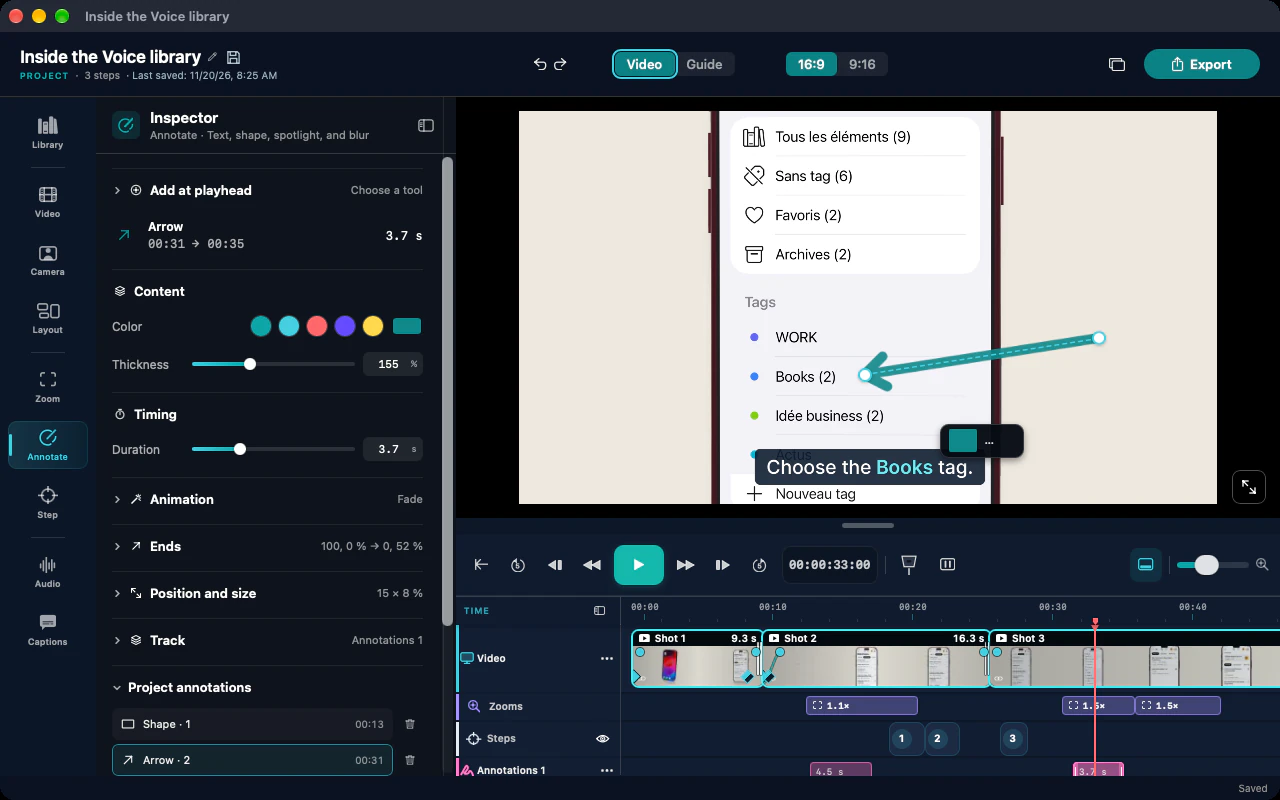
An arrow placed on the capture in the Studio editor, with its handles and settings.

Arrow, frame, spotlight, magnifier, blur.

Drop the annotation on the capture, right where to look.

The guide inspector and the A4 pages of the step-by-step guide in Studio.

Edit every step like text.

Titles, instructions, notes, images: everything is edited in the guide editor, before export.

PDF guide

Keep a written record of your videos.

Turn the recording into a step-by-step guide. Every step, image and instruction stays editable before the PDF export.

STEPSIMAGESPDF
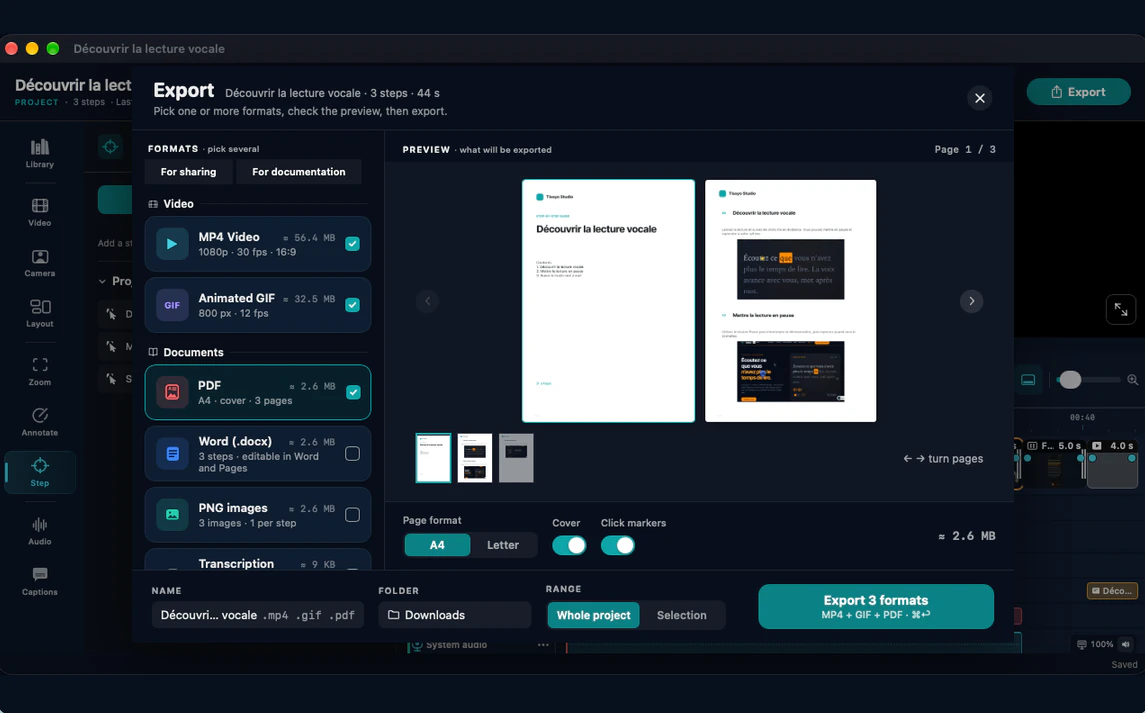
The Studio export window: MP4 video, animated GIF and PDF guide, with a page preview.

Formats and layout

One recording. Every format.

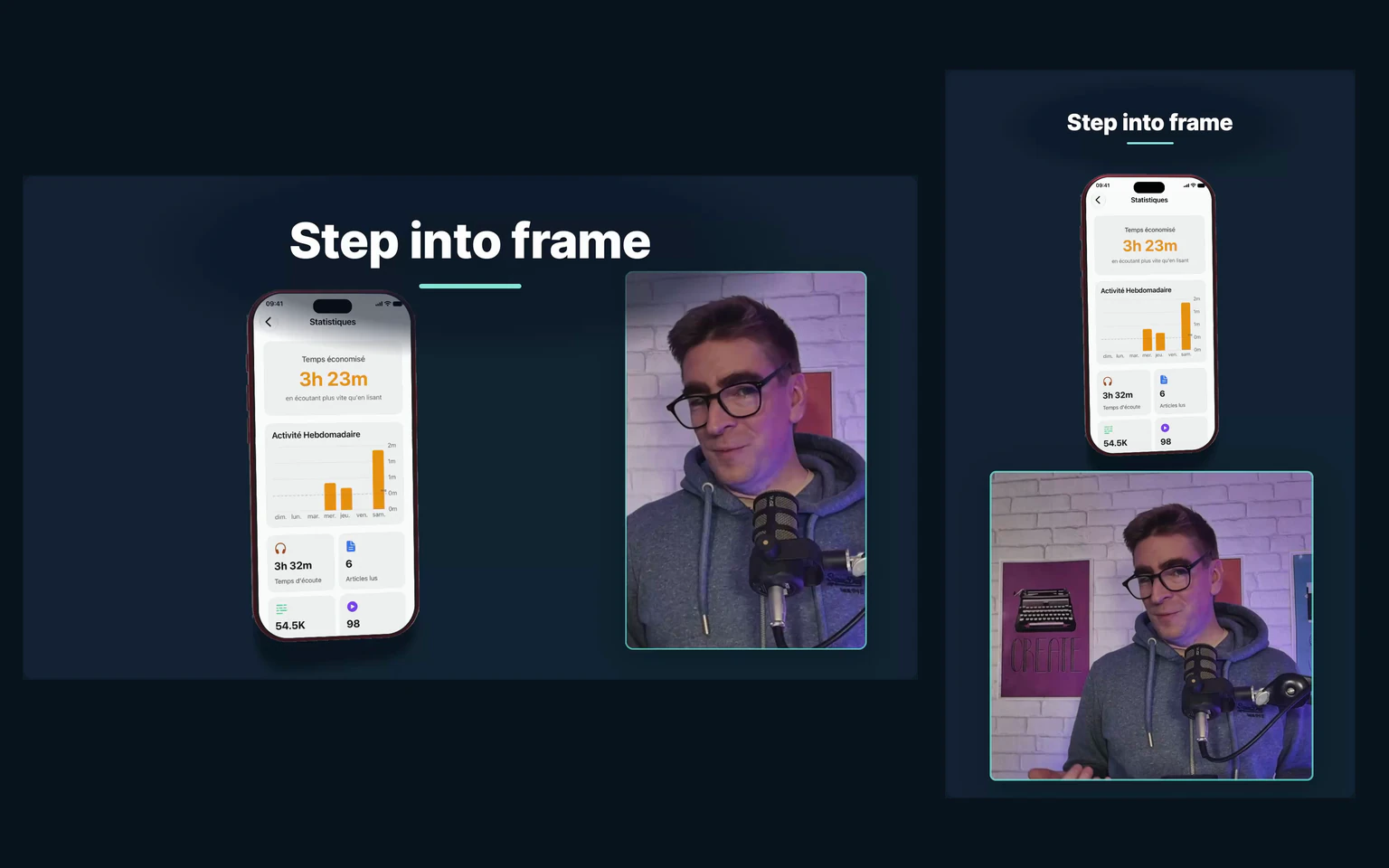
One recording can become horizontal or vertical without starting over. For each format, adjust the composition, move the webcam and choose its framing. Your original capture stays untouched.

  • Horizontal or vertical from the same project
  • A composition and webcam position for each format
  • Crop, zoom and layout settings stay editable after recording

In Studio 2.0.10 on Mac, enable App Store Preview in the advanced MP4 settings. Choose a 15–30 second clip for your iPhone, iPad or Mac App Store listing.

  • MP4
  • GIF
  • PDF
  • Word
  • PNG
  • SRT
  • Transcript (Mac)
  • Summary (Mac M1 or later, with Apple Intelligence)

Captions

Automatic captions, with style.

Written from your voice. Fix a word, pick one of 7 styles: they are ready.

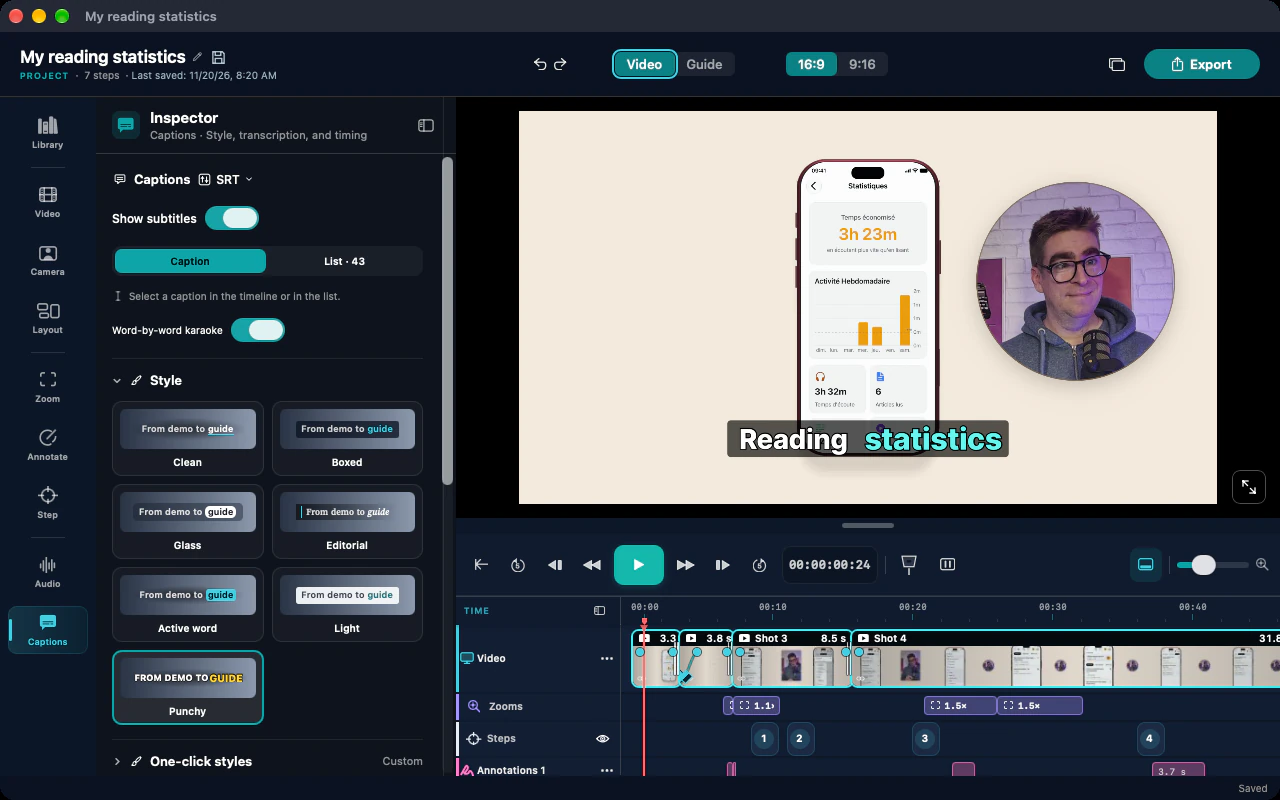
  • 7 styles, including word-by-word karaoke
  • Adjustable position, size, colors and background
  • SRT file export
Caption settings in the Studio inspector, with word-by-word karaoke and the active word in colour.

Animated titles

Animated titles that guide the eye.

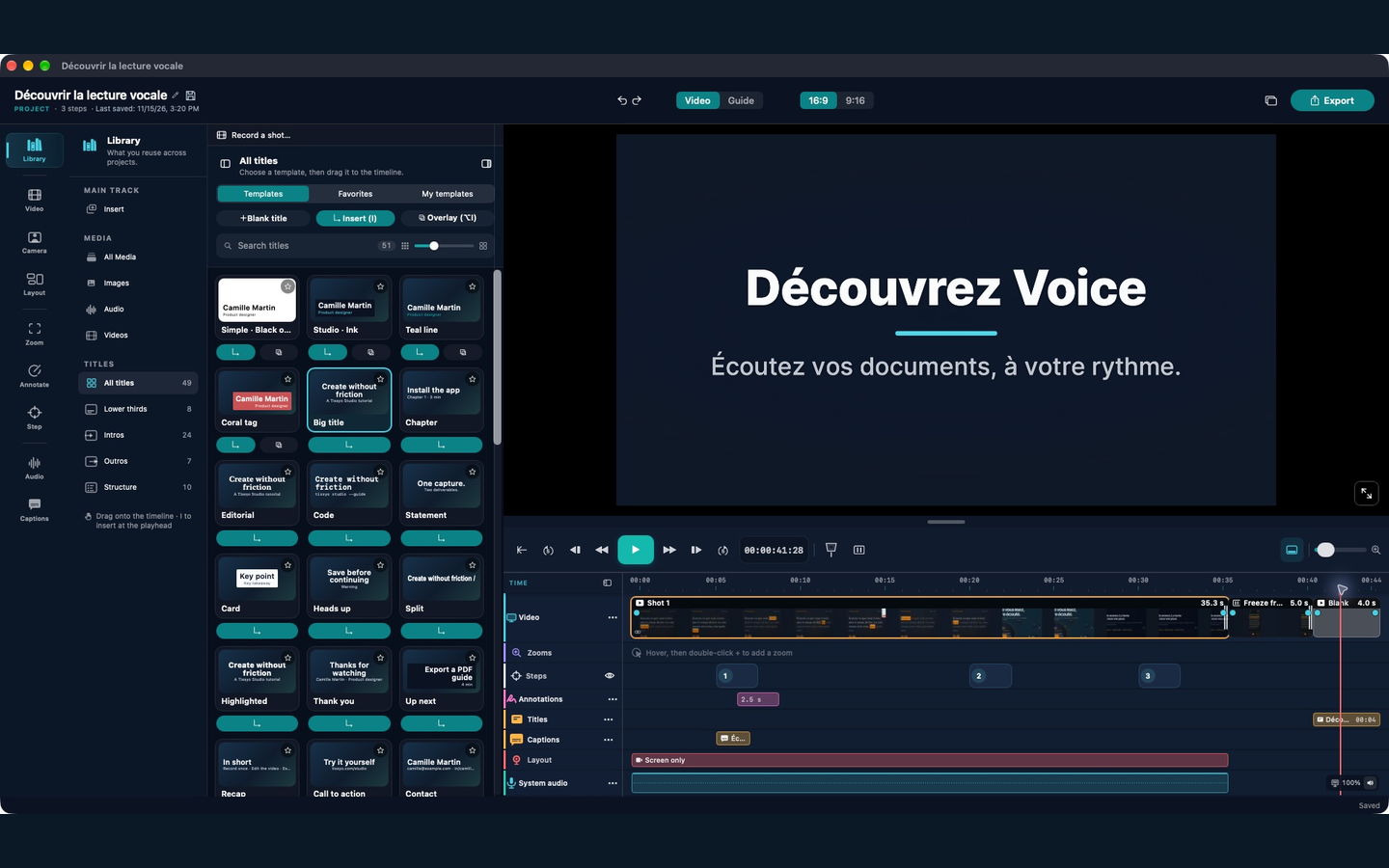
Choose a lower third, opening title or end credit and adapt it to your video.

  • Templates for lower thirds, intro and outro titles
  • Text, font and colors remain editable
  • Export titles directly to Final Cut Pro and DaVinci Resolve, where they remain editable (experimental)

With eight new animated title styles in Studio 2.0.10 on Mac, you can highlight a word, open a chapter or mark the current step. Try another style while keeping your text.

The title template library and an applied title in the Tissyo Studio preview.

New · 3D mockups

Elevate the way you present your apps.

Show your app in 3D iPhone and iPad mockups, in Apple’s official colors. Color, angle and tilt are set in a single panel. To change angle mid-video, drop a marker on the timeline.

Experimental

Record with Studio, finish in Final Cut Pro or DaVinci Resolve.

Capture and annotate in Studio, then carry on editing in Final Cut Pro or DaVinci Resolve.

  • Final Cut Pro: editable titles, annotations, camera bubble, background and zooms.
  • DaVinci Resolve: titles and annotations.
  • Captions: SRT file export.

Install the templates in Settings › Editing. These exports are experimental, and some elements may need adjusting in your editing software.

Final Cut Pro : un montage Studio avec les titres, annotations et fond Tissyo modifiables dans la timeline.

Examples

Videos made with Studio, in a few clicks.

The on-screen text is in French.

How does it work?

Preparing a recording in Tissyo Studio.

What do you want to create?

Record a software task once, then share the training video and a step-by-step guide learners can use after class.

Turn recurring tasks into process documentation with a reference video and a written SOP your team can follow.

Edit a landscape walkthrough for YouTube and reframe it vertically for short-form videos.

Capture the right take, trim your shots and annotate what matters before moving to the rest of the edit.

Show your app in use with a screen recording, titles and annotations. On Mac, stage the demo in a 3D iPhone or iPad mockup. Prepare the video for your App Store listing, too.

Try free for 14 days

Monthly or annual subscription after the trial.

Monthly

$12.99 /month

$12.99 billed every month.
Every Studio feature.

Annual

Save 42%
$89.99 /year

About $7.50/month.
$89.99 billed once, every year.

$65.89 saved over 12 months.

What’s included

* Requires Apple Intelligence on a compatible Mac.

US prices. Confirm local pricing and trial eligibility in the store.

Try free for 14 days

Before you start

Can I keep my projects?

You can still open and export your projects after cancelling.

What happens after the trial?

The subscription you choose starts when the trial ends, unless you cancel in the store.

What can I export?

MP4, animated GIF and PDF guides.

Can I finish in another editor?

Studio offers experimental exports to Final Cut Pro and DaVinci Resolve.

Make your next tutorial. Video and guide included.

Record the task once. You leave with the video, zoomed on your clicks, and the step-by-step guide ready to send.

Step by step: the complete method for a video tutorial and its guide →

Apple silicon and macOS 15 or later.

Also available for Windows →