 Studio
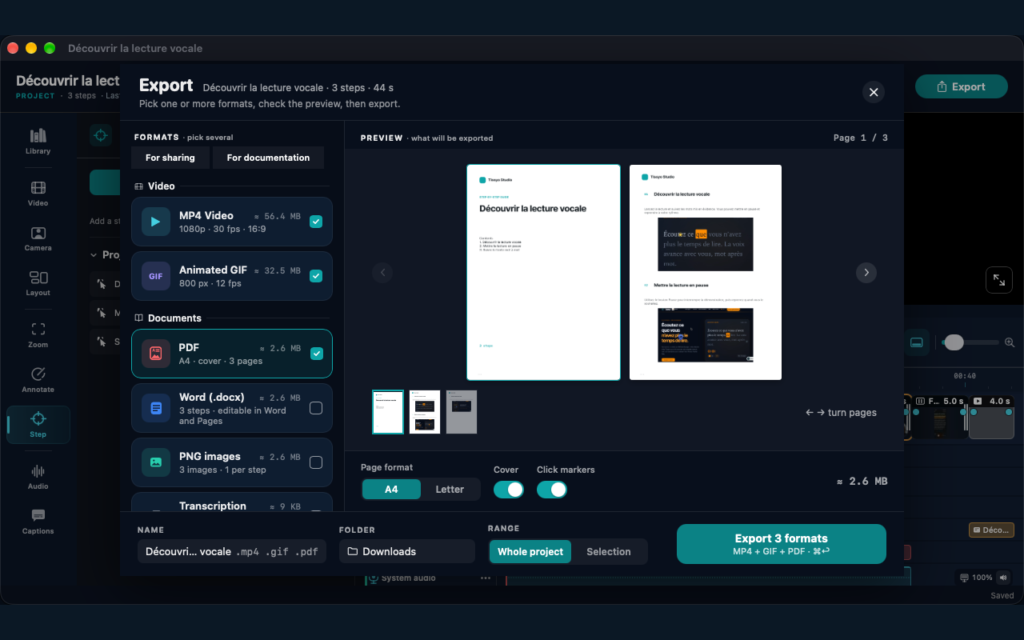
In short: choose MP4 to show a real sequence, an animated GIF for a very short action and the PDF guide for a procedure people read at their own pace. Tissyo Studio produces all of them from the same recording, and several formats can be exported in one click.
The same tutorial is not always consulted in the same way. A video shows the real rhythm of an action, while a guide allows you to go directly to a specific step.
MP4 and GIF to show
MP4 is suitable for training, product demonstrations, and help centers. GIF is useful for a short manipulation integrated into a message or page. The video exports in Full HD, in 16:9 for a screen or 9:16 for a phone. Every export is included during the trial and with the subscription.
PDF to guide
The PDF guide prints and shares easily, and keeps a stable layout. It can be laid out as a list or as A4 pages, with titles, instructions, notes and images that you can edit in Studio before exporting.
Transcript: turn the video’s narration into text
On Mac, you can also reuse the narration with Export → Transcription. Choose a text or Word file, with or without timecodes. This document contains the words spoken in the video; the PDF guide describes the steps to follow.
GIF for a short action
The animated GIF quickly shows a short, repeatable action. It fits into existing technical documentation, a repository or a knowledge base.
Choose by use, not only by tool
Use MP4 to show a real sequence, the animated GIF for a very short gesture and the PDF for a stable, shareable and printable guide. For a help center, combining a short video with a searchable guide usually covers more situations.
Plan for maintenance
Add the date and the version of the software shown. Keep the source files, screenshots and related media. Before publishing, open each export on another device and check links, media weight, step order and image readability.
Which format for which situation?
- Help center: a short MP4 at the top of the article, accompanied by the PDF guide.
- Onboarding a new colleague: the 16:9 video to watch once, then the PDF guide to keep at hand.
- Quick answer in a chat or an email: an animated GIF showing only the gesture in question.
- Social network or phone viewing: the video in 9:16, with subtitles for people watching without sound.
- Procedure to adapt: the Studio project, to edit the guide and export a new PDF.
Before sharing, give each file a clear name that includes the task and the date, so readers can tell at a glance which version they have. When the interface changes, update the project once and export again every format you published.
FAQ
Do I have to record twice to get a video and a guide?
No. In Tissyo Studio, recorded clicks help create the guide steps and the zooms in the video.
Which format should I use for a phone?
Export the video in 9:16. For a quick message, a short GIF is often enough.
Can I still export my projects without a subscription?
Yes. Even without a subscription, you can always open and export your projects.
See how to produce the video and the guide from one recording.